
Solution guide · GoHighLevel
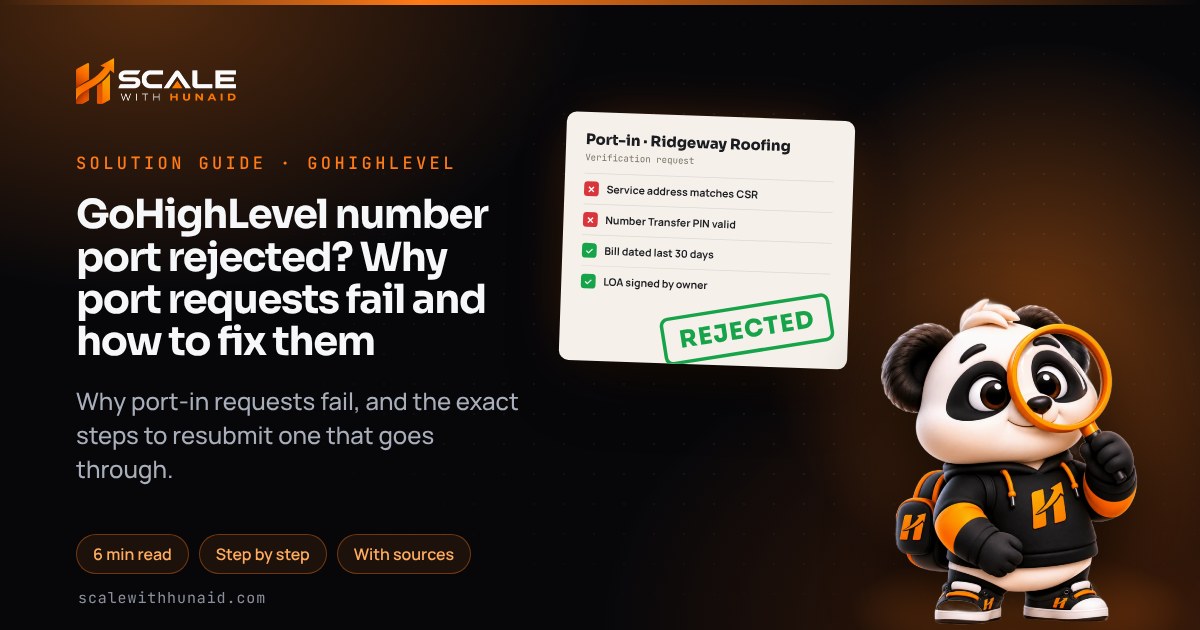
GoHighLevel number port rejected? Why port requests fail and how to fix them
Why a GoHighLevel number port gets rejected — address, PIN, account number, bill or LOA — and the exact steps to resubmit it so the port goes through.

Key takeaways
- Almost every rejected GoHighLevel port request fails because a detail on the request does not match what the current carrier has on file: the name, the service address, the account number or the PIN.
- A rejected request cannot be edited in GoHighLevel; you read the reason in Phone Numbers → Port-In Numbers, correct the details with the current carrier, delete the rejected request and submit a new one.
- Mobile numbers need a Number Transfer PIN from the current carrier, and those PINs expire after a few days, so request it on the day you submit.
- Never cancel the old carrier until the port is complete — a cancelled account cannot be ported and the number can be lost.
- A finished port does not make SMS work by itself: the number still has to be linked to an approved A2P 10DLC campaign and re-selected in your workflows.
A rejected port request in GoHighLevel almost always means one thing: a detail on the request did not match what your current carrier has on file. The losing carrier compares the name, service address, account number and PIN with its own records, and if one character is off, it refuses the port. The fix is to get those details from the carrier itself, then resubmit a fresh request.
This guide covers where to find the rejection reason, every common cause and its fix, how to get a Number Transfer PIN from the big three US carriers, what to do when a port is stuck, and the steps people miss after the port completes. It is the same checklist I use when I move numbers during a GoHighLevel setup.
What a rejected port request means in GoHighLevel
Porting moves a phone number from your current carrier to LC Phone, GoHighLevel’s built-in phone system. As of November 2026, HighLevel’s in-app port-in flow is available to Agency Owners and Agency Admins through Labs and covers US numbers only. International numbers go through support, who submit Twilio’s international porting form for you.
When the current carrier refuses the request, the status changes to rejected and the reason appears in the Port-In Numbers tab or in the email notification. Two rules shape everything that follows:
- A rejected request cannot be edited. You delete it and submit a new one.
- Your number is still with the old carrier. Nothing is lost as long as that account stays active.
Rejected
- Avoid: Address typed from memory
- Avoid: PIN expired or guessed
- Avoid: Bill over 90 days old
- Avoid: LOA never signed
- Avoid: Old account cancelled
Accepted
- Do: Address copied from the CSR
- Do: PIN requested on the day
- Do: Bill from the last 30 days
- Do: LOA signed by the owner
- Do: Old account kept active
Why GoHighLevel port requests get rejected
HighLevel lists the usual causes as an invalid address, a mismatched account number, an incorrect PIN, a suspended account, or a billing statement older than 90 days, plus an unsigned Letter of Authorization (LOA). Twilio, which runs LC Phone’s porting, says the most common reason of all is incorrect name or address information.
| Rejection reason | What the carrier checked | The fix |
|---|---|---|
| Name or address mismatch | Authorised name and service address on the account | Copy both exactly from the carrier’s Customer Service Record (CSR) |
| PO Box used | Physical service address | Use the street address on the account — PO Boxes are not valid |
| Wrong account number | Account number on the losing carrier’s system | Take it from the latest bill, not an old contract |
| Invalid or expired PIN | Number Transfer PIN for mobile numbers | Request a new PIN the day you submit |
| Suspended account | Account status | Pay any balance and reactivate before resubmitting |
| Invalid billing statement | Bill shows the number, owner name and provider | Upload the most recent bill as a PDF |
| LOA not signed | Signature of the authorised owner | Sign the LOA HighLevel emails to the authorised contact |
How to fix a rejected port request, step by step
These steps follow HighLevel’s port-in instructions as of November 2026.
- Read the reason. Go to Phone System → Phone Numbers → Port-In Numbers, open the rejected request and copy the rejection description. Note the Request SID.
- Ask the current carrier for a CSR. The Customer Service Record shows exactly what they hold. Twilio calls a CSR the surest way to reduce the likelihood of rejection.
- Download your latest bill. Twilio asks for a bill from the last 30 days showing the account number, owner name and address. HighLevel rejects anything older than 90 days, so the newest bill is the safe choice.
- Get a fresh PIN for any mobile number (see the next section).
- Delete the rejected request. It cannot be edited.
- Submit a new request: Phone Numbers → Add Number → Port-in Numbers. Tick the agreement checklist, then enter the carrier account number, the numbers, the wireless PIN (or last four of the SSN where the carrier asks), the authorised contact, the service address exactly as it appears on the CSR, and upload the bill (PDF or image, up to 10 MB).
- Save the new Request SID from the confirmation window.
- Sign the LOA. HighLevel generates it and emails it to the authorised contact for digital signature. If nobody signs it, the request does not move.
Rejected for the PIN: how to get a Number Transfer PIN
Wireless numbers need a PIN, and HighLevel warns that an incorrect or fake PIN will be rejected by the carrier. The PIN comes from your current carrier, and the big three work differently:
| Carrier | What it is called | How to get it | Who can request it |
|---|---|---|---|
| Verizon | Number Transfer PIN | My Verizon, or dial #PORT; turn Number Lock off first | Account Owner or Manager |
| AT&T | Number Transfer PIN | Account settings → Transfer phone number → Request new PIN, or dial *PORT | Primary user on business accounts |
| T-Mobile | Temporary Port Out PIN | T-Mobile account; turn Port Out Protection off first | Primary Account Holder |
Sources: Verizon, AT&T, T-Mobile. The trap is the expiry date:
A PIN that expires before the carrier checks the request is treated as invalid. Request it on the day you submit.
Source: AT&T, Get a PIN to Transfer Your Wireless Number; Verizon, Port-out FAQs (as of November 2026)
T-Mobile also asks for the account number from your bill and the billing ZIP code, so have both ready.
Port request stuck pending: what to check
A request that sits in pending is usually waiting on paperwork rather than broken. Work through these in order:
- Is the LOA signed? Check the authorised contact’s inbox, including spam, for HighLevel’s signature email.
- Is it within the normal window? HighLevel estimates about 2–4 weeks for fewer than 50 numbers and 6–8 weeks for larger or complex ports, and same-day or date-specific ports are not guaranteed.
- Check the carrier action details shown against the Request SID in Port-In Numbers.
- Contact HighLevel support with the sub-account (location) ID, the number in E.164 format (+1 and ten digits), and the Request SID.
The FCC requires simple ports to be completed within one business day. That covers the carrier-to-carrier step once a valid request is accepted, not the document review before it, which is why HighLevel’s estimate is longer.
Port completed but SMS or calls are not working
HighLevel’s migration guide is clear that a successful transfer does not complete messaging compliance. After the port:
- Link the number to your approved A2P 10DLC campaign. In Settings → Phone System → Phone Numbers it should show the green A2P Verified label. If you do not have a campaign yet, see why A2P campaigns get rejected.
- Wait for provisioning. HighLevel says to allow 24–48 hours after a port before treating SMS errors as real.
- Re-select the number everywhere it is stored: Conversations sender settings, workflows, campaigns, default messaging settings, user-assigned numbers and any integration.
- Check the number is SMS-enabled under Phone Numbers. Some older or ported numbers arrive voice-only.
- Send a test text and make a test call. If calls do not ring, follow the incoming-calls fix; if texts fail with a carrier error, see SMS error 30007.
Getting a port accepted first time
- 1Request the CSRSee exactly what the carrier holds.
- 2Download the latest billDated within the last 30 days.
- 3Get a fresh PINRequest it on the day you submit.
- 4Copy details exactlyName, address and account number.
- 5Sign the LOAThe authorised owner signs it.
- 6Keep the old line liveCancel only after the port completes.
Most of the delay in porting is avoidable. The rejections I see are nearly always someone typing the address from memory, using an expired PIN, or uploading an old bill. Spend ten minutes on the phone with the current carrier first, get the CSR, and the request usually goes through on the first submission.
Next steps
If the port is part of a bigger move into GoHighLevel, I handle the number transfer, A2P registration and workflow re-pointing as one job in a GoHighLevel CRM setup, so nothing goes quiet in between. If your texts are blocked after the move, A2P 10DLC registration gets the number approved for messaging. Porting rules are federal, so the steps are the same in every state, whether you are in Texas or New York.

References
- Submit and Track Port-In Number Requests in HighLevel — HighLevel Support Portal
- Porting your phone number (non-Twilio number) to a location/subaccount — HighLevel Support Portal
- Moving Phone Numbers: Migration Guide — HighLevel Support Portal
- Number Hosting for LC Phone: Hosted SMS/MMS — HighLevel Support Portal
- Error: Not a Valid SMS-Capable “From” Number — HighLevel Support Portal
- United States: Porting Guidelines — Twilio
- Number is “rejected” during the porting process — Twilio Help Center
- Why should I provide a CSR with my port request? — Twilio Help Center
- How to Port a Phone Number to Twilio — Twilio Help Center
- Porting: Keeping Your Phone Number When You Change Providers — Federal Communications Commission
- Move your mobile number to another carrier FAQs — Verizon
- Get a PIN to Transfer Your Wireless Number — AT&T
- Transfer your phone number — T-Mobile